Your car’s own shift lights, on any strip
Every car has its own shift lights: the colours, the order, the revs each one comes on at. OpenDash lights your strip the way the real car does, and uses the sides for what matters.
A 3/9/3 strip, drawn by the site. Each side is three single lamps, counted from the outside in: a car alongside, then flags, then your car and the aids. The pit limiter takes the whole strip.
Lit like the real car
A Porsche lights like a Porsche and a Ferrari like a Ferrari. The shift points come from Lovely Car Data, an open table of measured cars. One click on the Lights tab fetches it, and nothing about you or your car leaves your machine.
Car light data: Lovely Car Data, by Lovely Sim Racing, ATSR and Gomez Sim Industries, CC BY-NC-SA 4.0. Fetched by the plugin, never bundled. Lovely Car Data on GitHub.
Every strip, every wheel
Pick your strip by counting its LEDs: sides and centre. 62 shapes are included, from a 3/9/3 rim to a 25-LED brow, and any device SimHub drives can have one. A car without a table still gets the shift points iRacing publishes for it.
62 strip shapes
A strip is sides and a centre: 0 to 4 LEDs each side, 4 to 12 in the middle, and bare runs up to 25 for a brow. Pick yours by counting, not by brand.
| Sides | 4 | 5 | 6 | 7 | 8 | 9 | 10 | 11 | 12 |
|---|---|---|---|---|---|---|---|---|---|
| 0 | 0/4/0 | 0/5/0 | 0/6/0 | 0/7/0 | 0/8/0 | 0/9/0 | 0/10/0 | 0/11/0 | 0/12/0 |
| 1 | 1/4/1 | 1/5/1 | 1/6/1 | 1/7/1 | 1/8/1 | 1/9/1 | 1/10/1 | 1/11/1 | 1/12/1 |
| 2 | 2/4/2 | 2/5/2 | 2/6/2 | 2/7/2 | 2/8/2 | 2/9/2 | 2/10/2 | 2/11/2 | 2/12/2 |
| 3 | 3/4/3 | 3/5/3 | 3/6/3 | 3/7/3 | 3/8/3 | 3/9/3 | 3/10/3 | 3/11/3 | 3/12/3 |
| 4 | 4/4/4 | 4/5/4 | 4/6/4 | 4/7/4 | 4/8/4 | 4/9/4 | 4/10/4 | 4/11/4 | 4/12/4 |
LEDs, for more than revs
The sides light for what matters in the moment: a flag, a car alongside, the limiter, a warning. The first thing on the list that is true takes the lamp.
Shift now Blue flag Waved yellow A car on your left Low fuel ABS, under braking Pit limiter
In order of what takes the flag lamp:
- 1RedCritical
- 2DisqualifiedCritical
- 3Black furledCritical
- 4BlackCritical
- 5MeatballCritical
- 6Full-course cautionCritical
- 7Waved yellowCritical
- 8YellowCritical
- 9DebrisCritical
- 10BlueCritical
- 11WhiteDropped when quiet
- 12GreenDropped when quiet
- 13SetDropped when quiet
- 14ReadyDropped when quiet
- 15ChequeredDropped when quiet
- 16Pit: speeding in the pit lane, then limiter on, outside the lane, then limiter on, in the laneCritical
- 17Warnings: oil temperature, then water temperature, then low fuelCritical
A car alongside is a bar down that edge, drawn over everything else. A switch keeps only the critical ones.
The flag box
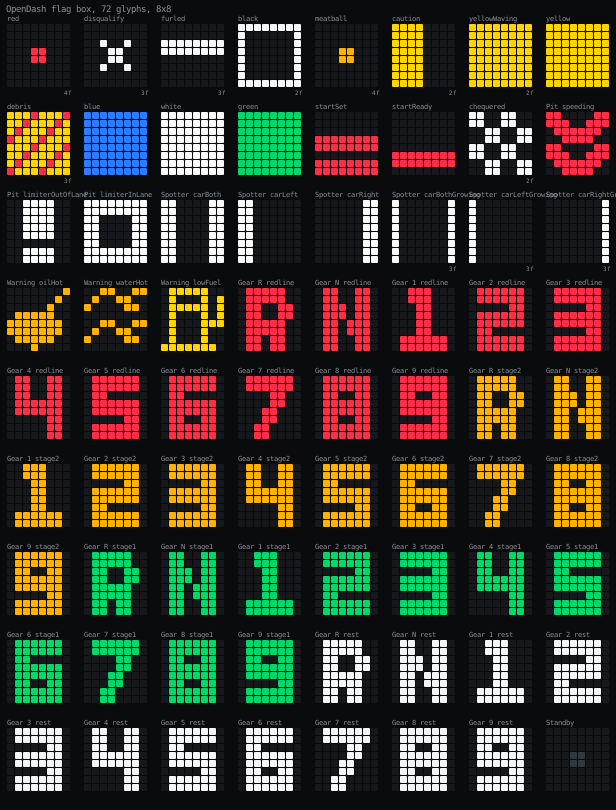
An 8 × 8 WS2812b matrix on an Arduino, beside the screen. 69 glyphs, one at a time, in priority order: the flag that is out, the pit state, the warnings, then the gear.
Set the device up first
Set rotation and serpentine on the device in SimHub before anything else. Wrong values make the picture sideways or shredded.
Mounting side is where the box is
Not what it shows. A box on the left that lights for a car on the right is worse than no box.
Never installed for you
OpenDash never installs a profile by itself. Press Install on the Lights tab.
Checked, not yet driven
No matrix is plugged into the test machine. The glyphs are checked in tests and in SimHub’s preview, not yet on a real panel.
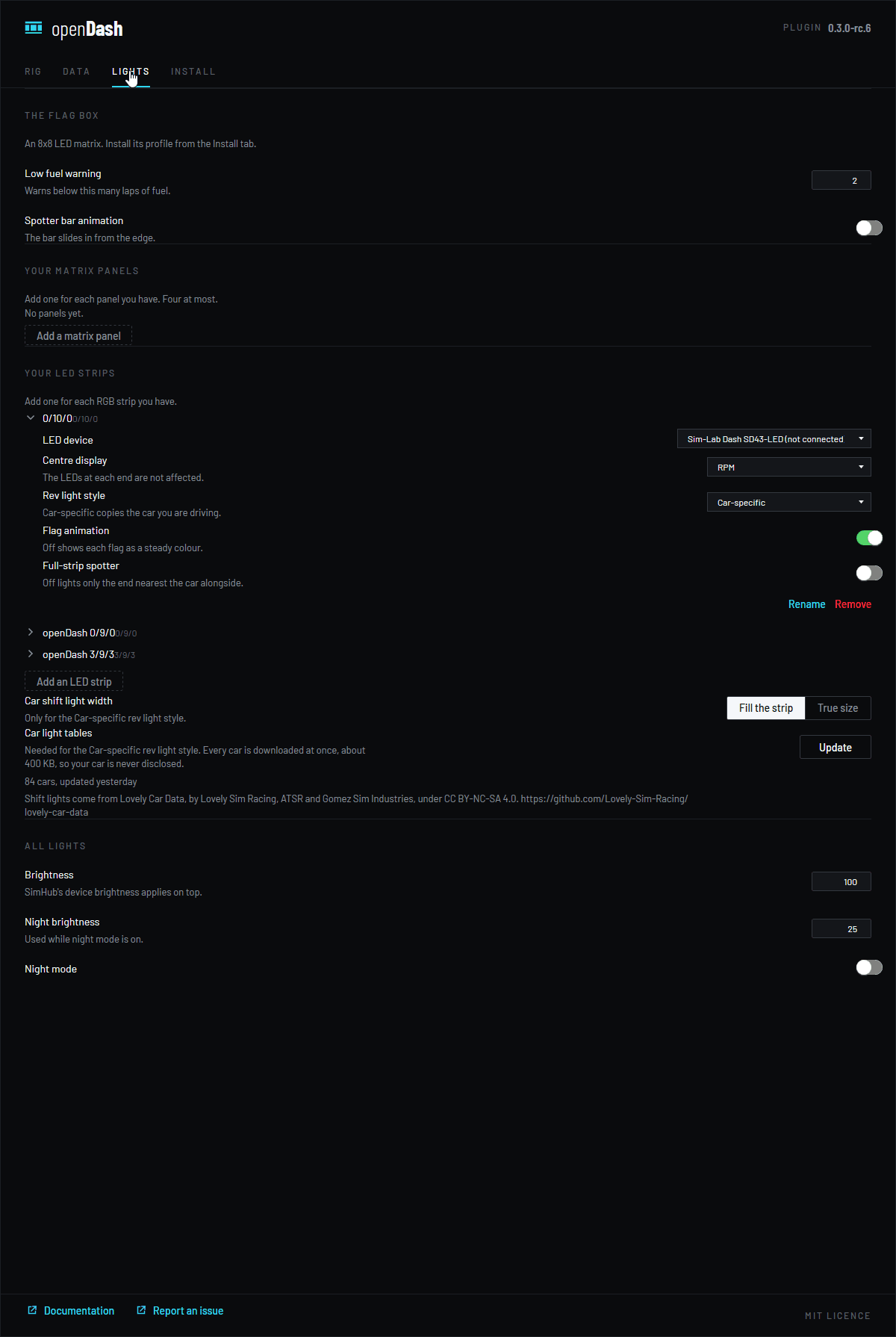
The Lights tab
The flag box and up to four matrix panels, a low fuel warning in laps, a strip per device with its centre display and rev style, the car tables, and brightness and night mode for every light.