The Porsche face
Drawn like the 992’s own display, for the Porsche 911 GT3 R (992), Porsche 911 GT3 Cup (992.2), Porsche 911 GT3 Cup (992.1) and Porsche 911 GT3 R (991.2). When you drive one of them, SimHub puts this face on the screen and the plain face comes back for every other car.
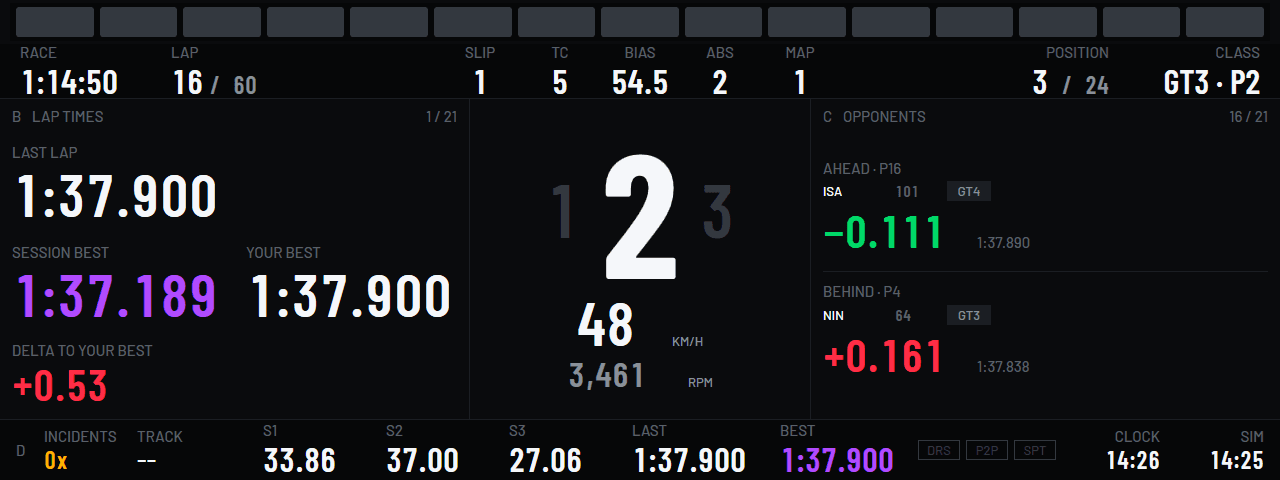
- The car’s shift lights. Sixteen round dots that light from both ends inwards, three green, three yellow and two red a side, and all sixteen blue and flashing at the shift point.
- The car’s top strip. The session in red at the left, the speed in a grey box over the gear, the lap beside it, and the track state in the teal outline at the right.
- The car’s body. The pages in grey outlines, the gear on a tile of its own, a column of coloured setting boxes down the left and the car’s own telltales down the right.
- The car’s limiter. It takes the whole body: green under the pit lane limit, red over it, with the speed, the limit and the gear still in the middle. A setting you change shows in a blue box, and a tank under ten litres in a red one.
- The car’s type. Barlow at its normal width, labels and values alike. Nothing condensed.
- The car’s foot. One more page on band D, called Porsche: the badge, the traction and ABS boxes, the tyre box and the brake bias. A Porsche face opens on it.
Every size the plain face comes in
Each one is drawn from the same rules as the 1280 × 480, which has the car’s own 8:3 shape. The round faces are not themed.
- 1920 × 480Face
- 1280 × 720Face
- 1280 × 480Face
- 1280 × 400Face
- 850 × 480Face
- 800 × 480Face
- 800 × 286Face
- 600 × 686Face
What a theme is
The same dashboard in the car’s register: nothing taken away, and the car’s own way of showing it put on.
- Every page and every field stays. A theme may change the colours, the type, the chrome and where the parts of the face sit. It may never remove a page or drop a field. That is the line between a theme and a skin.
- You choose it when you add a screen. The plugin’s Add sheet asks the kind, the size, and then the theme where the size has one. A themed screen is a dashboard of its own in SimHub, beside the plain one.
- It follows the car. The plugin writes SimHub’s own per-car playlist, so the display shows the Porsche face when you drive a Porsche and the plain face for everything else. No switch to press.
- The crest is yours, not ours. A manufacturer’s mark cannot ship in an open-source package, so the plugin fetches the crest once, from an address you can change or clear on the Screens page, into your own SimHub folder. Until then the badge is an empty shield. Nothing about which car you drive leaves your machine for it.
- Named as a driver says it. The theme is called Porsche in OpenDash’s own type, never styled as the manufacturer presents it. The scope says what a theme may take from the car and what it may not.
What follows
A theme covers a display family rather than one car: the Porsche’s display is shared by the 992 GT3 R, both Cup cars and the earlier GT3 R, and one theme serves all four. That makes 2 themes so far.
More families are drawn by ticket, one at a time, each researched from the car’s own manual before a line of it is coded. The list is on GitHub, where a car you drive can be asked for. No dates are promised here.
Free, like the rest
OpenDash is 100% free and always will be. The car themes are free too. A face drawn like your car’s own display costs what the plain one does: nothing. No licence, no account, nothing to unlock.
Install the plugin and add a Porsche screen from the Screens page.